How to distinguish multiple inference engines in Open WebUI?

Open WebUI serves as a sophisticated orchestration layer, capable of aggregating multiple backends into a unified interface. For AI infrastructure professionals managing hybrid environments—combining Ollama in Docker, vLLM on GPU clusters, and external OpenAI-compatible endpoints—maintaining backend isolation is a prerequisite for operational stability. Without a robust naming strategy, identical model IDs (e.g., llama3.1:latest) served by different engines create collision issues, making granular routing and performance monitoring impossible.
Multi-backend architecture in Open WebUI
Open WebUI operates as an intermediary between the UI layer and various backend inference engines. The system’s architecture relies on a Connection layer that translates user prompts into API calls for specific endpoints. Implementing namespacing within this layer improves observability and governance by clearly defining the relationship between the front-end model selection and the back-end compute resource.
This multi-backend inference approach allows for strict backend isolation, ensuring that specific workloads are routed to the appropriate LLM infrastructure based on cost, latency, or security requirements.
Using Prefix IDs for backend isolation
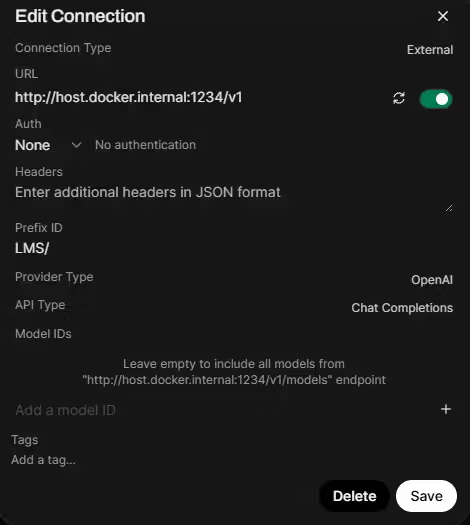
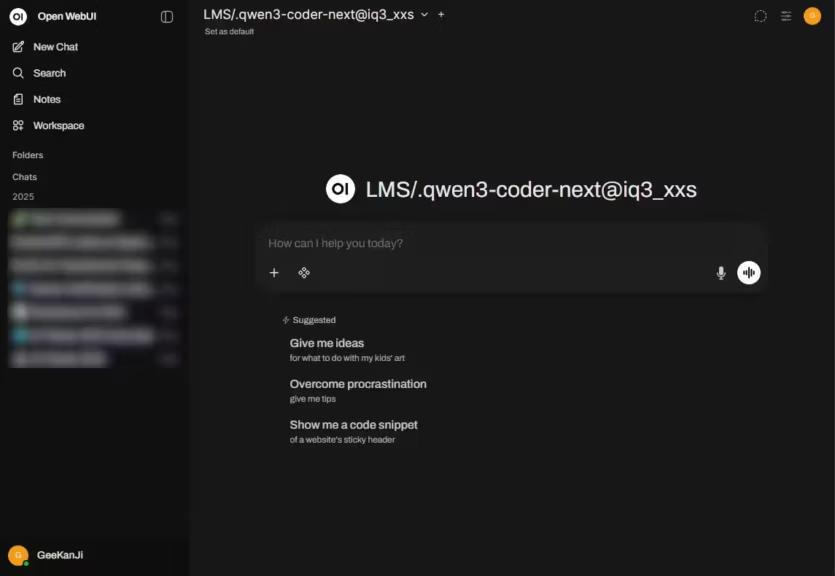
In Admin Settings > Connections, the Prefix ID field allows architects to establish distinct namespaces for each engine. By assigning a prefix (e.g., prod-vllm or edge-ollama), Open WebUI prepends this string to every model ID imported from that connection.
Technical behavior of Prefix IDs:
- UI Layer Processing: Open WebUI internally strips the prefix before forwarding the request to the backend engine. The backend receives the original, raw model ID it expects.
- Inference Integrity: Prefixes are purely organizational; they do not modify quantization, precision, or the underlying inference behavior of the model.
Recommended Namespace Configuration
| Connection Type | Prefix ID | Model Identification in UI |
|---|---|---|
| vLLM (Data Center) | vLLM | vLLM.llama-3.1-70b |
| Ollama (Edge Node) | Ollama | Ollama.phi-3-mini |
| TensorRT-LLM | TRT | TRT.mistral-large |
This distinction is vital for accurate Ollama vs vLLM comparisons, as many Ollama-distributed models are commonly published in Q4 variants (e.g., Q4_K_M), while vLLM or TensorRT-LLM typically serve higher precision weights.
Operational observability and failover strategy
Effective prefixing enables enterprise-grade log correlation and deployment verification. By differentiating engines at the UI level, architects can implement:
- Latency Benchmarking: Comparing the Time To First Token (TTFT) between different backends serving the same model architecture.
- Failover Verification: Ensuring a seamless transition from a “Cloud/” prefix to a “Local/” fallback during provider outages.
- Engine-level Performance Comparison: Analyzing how different runtimes handle specific tasks, such as integrating the Model Context Protocol (MCP).
Known limitations with some providers
While Prefix IDs are powerful, they may not behave consistently with all OpenAI-compatible providers. According to official Open WebUI documentation and community GitHub discussions, certain edge cases exist:
- Compatibility Issues: Some providers, such as OpenRouter or Hugging Face endpoints, may struggle with model identification when prefixes are applied.
- Filter Conflicts: Issues may occur when Prefix ID and Model ID filtering are combined in a single connection.
- Traceability: In some versions, a known provider limitation issue may cause the UI to display the raw ID despite the prefix being set.
It is recommended to validate prefix behavior on a per-connection basis before production deployment.
Model ID filtering for whitelist management
The Model IDs (Filter) field serves as a whitelist to reduce noise in the model selector. This is essential when a backend exposes an entire library of experimental or legacy models. Restricting the visible models ensures that users only access engines optimized for specific hardware limitations, such as BF16/FP16 support constraints.
FAQ
How can I verify if my Prefix ID is correctly stripped?
You can monitor the backend logs of your inference engine (e.g., vLLM or Ollama). The incoming request should show the model name without the prefix assigned in Open WebUI.
Can I change a Prefix ID on a live production environment?
Changing a Prefix ID will result in Open WebUI treating the models as new entities. Existing chat histories linked to the previous model ID (with the old prefix) may lose their direct model association.
Do filters support wildcards?
Currently, Model ID filtering requires comma-separated exact matches. Refer to the GitHub discussion on Prefix IDs for upcoming changes to model management.
Your comments enrich our articles, so don’t hesitate to share your thoughts! Sharing on social media helps us a lot. Thank you for your support!