Local AI Video on RTX: Mastering the NVIDIA 3D-to-Diffusion Workflow
Local AI video generation in 2026 is undergoing a radical structural shift. For too long, creators have been held hostage by the “slot machine” nature of Text-to-Video (T2V) and Image-to-Video (I2V) models, where every generation is a gamble against spatial drift and perspective hallucinations. While these methods offer speed, they lack the surgical precision required for professional storytelling and shot-to-shot consistency.
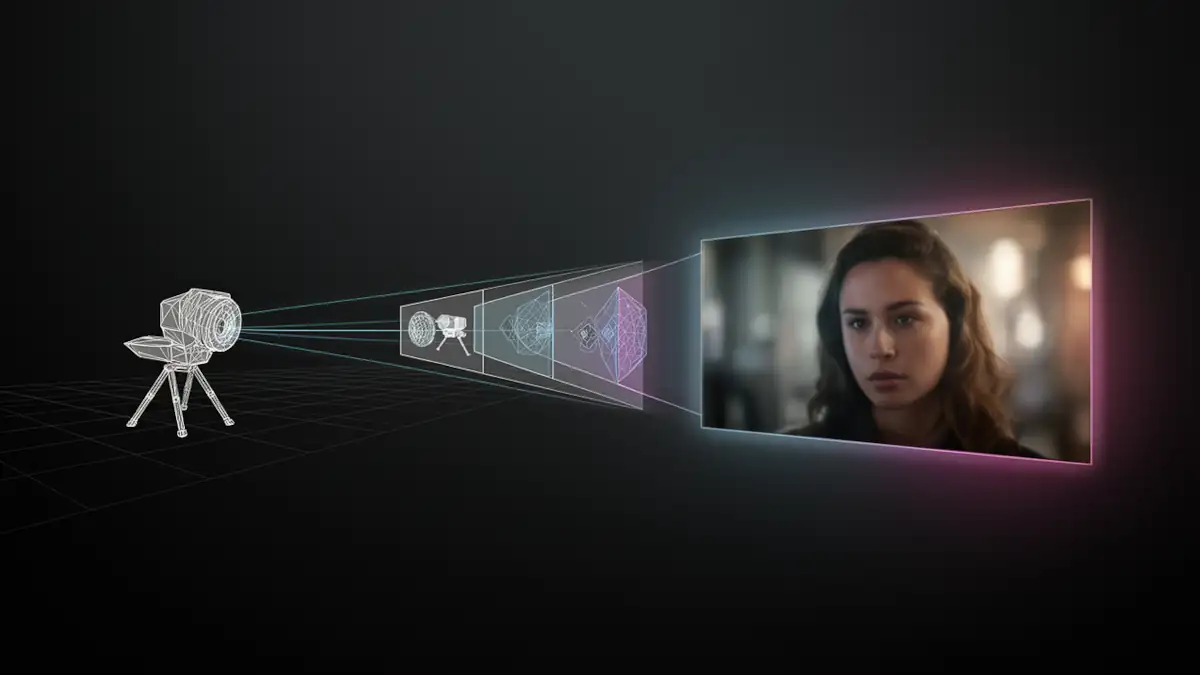
NVIDIA’s “RTX AI Video Generation” blueprint marks a fundamental paradigm shift: moving from prompt-based randomness to 3D-enforced structure. By integrating a hybrid pipeline that starts in an environment like Blender, NVIDIA is effectively placing a “geometric straitjacket” around unruly diffusion models. This approach ensures that composition, camera movement, and depth are dictated by math and geometry rather than the whims of an AI’s latent space.
In this new workflow, the AI is no longer an unpredictable “illustrator” acting on vague descriptions. Instead, it becomes a disciplined “camera operator” and “texture artist” executing a vision already defined in three-dimensional space. This guide dissects how to master the LTX-2.3, FLUX.1 Depth, and RTX Video VSR stack to move beyond experimental clips toward controllable, production-ready local AI video.
1. Introduction: Breaking the “Slot Machine” of Generative Video
The shift toward 3D-driven control is not just a conceptual evolution, it fundamentally changes how AI video pipelines are structured and operated.
Instead of relying on prompt interpretation alone, this workflow introduces a layered architecture where:
- spatial structure is defined upfront in a 3D environment,
- image generation respects that structure,
- and video models operate within constrained temporal boundaries.
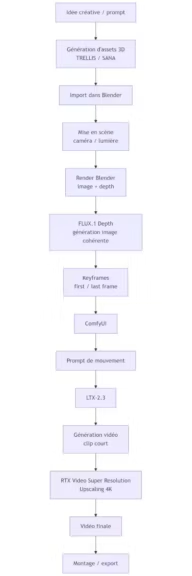
This distinction is critical. Traditional Text-to-Video and Image-to-Video approaches attempt to solve composition, motion, and rendering simultaneously within a single model. The NVIDIA blueprint separates these concerns into discrete stages, each optimized for a specific task.
As a result, the pipeline moves closer to a production-oriented workflow, where consistency, iteration, and control take precedence over raw generative novelty. This is what enables the transition from experimental clips to more structured, reusable video production.
2. The Architecture of Control: Deconstructing the Blueprint
The power of the NVIDIA “RTX AI Video Generation” blueprint lies in its modularity. Instead of asking a single model to handle everything from character design to fluid physics, the pipeline breaks the creative process into three manageable layers: asset creation, spatial grounding, and temporal animation.
2.1 Asset Genesis: TRELLIS, SANA, and the Mesh Advantage
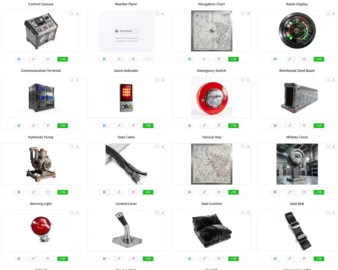
Unlike standard Image-to-Video (I2V) workflows where a character might morph or lose its identity between shots, this blueprint begins with the 3D Object Generation stage. Using state-of-the-art models like TRELLIS and SANA, creators generate actual tridimentional assets from simple prompts or images.
- Multi-Shot Consistency: By creating a high-fidelity 3D mesh first, you ensure that your protagonist or prop remains identical across different camera angles and lighting conditions.
- Topology Control: Parameters like Sparse Structure Sampling Steps allow for granular control over the mesh density, ensuring that silhouettes remain sharp and professional when imported into Blender.
- Material Precision: The Latent Sampling Steps manage surface detail, allowing for dynamic lighting within a 3D engine that static 2D images simply cannot match.
2.2 Spatial Grounding: FLUX.1 Depth vs. ControlNet
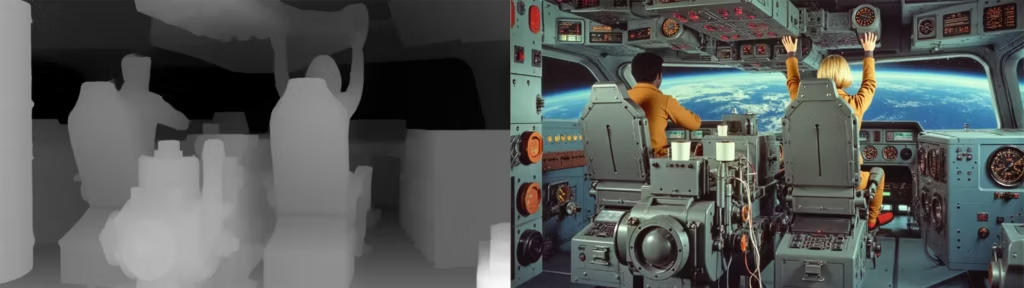
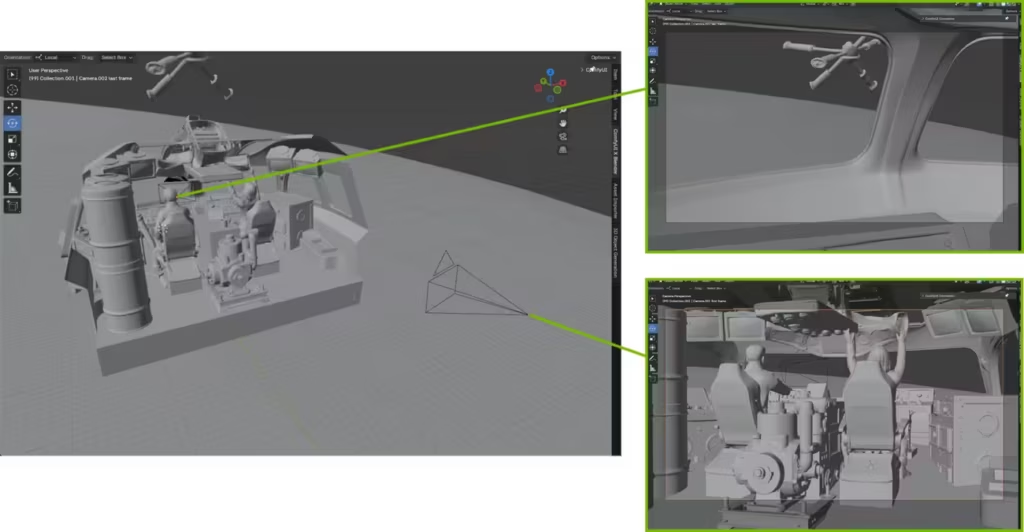
Once your assets are staged in Blender, the scene provides spatial structure (composition, camera, geometry) that guides image generation. Unlike ControlNet-based approaches that consume an externally generated depth map as a conditioning overlay, FLUX.1 Depth is natively trained to model spatial geometry as part of its own generation process. Rather than reading a depth map imposed from outside, it derives its own depth representation from the 3D scene structure provided by Blender, using it to enforce perspective consistency and occlusion accuracy across keyframes.
- Native Depth Integration: Unlike traditional workflows that use a secondary ControlNet layer on top of a base model, FLUX.1 Depth is natively trained to interpret 3D geometry.
- Perspective Locking: It uses the depth map as a rigid mold to generate photorealistic keyframes that strictly respect the 3D scene’s perspective and occlusions.
- Internal Link: To maximize the efficiency of these heavy generations, Blackwell users should leverage the NVFP4 format to maintain high-speed inference without quality degradation.
2.3 Temporal Logic: LTX-2.3, DiT, and the Gemma 2B Encoder
The final layer of the trinity is the animation engine, LTX-2.3. This model is responsible for bridging the gap between your generated “First Frame” and “Last Frame” keyframes.
- Diffusion Transformer (DiT): LTX-2.3 utilizes a modern DiT architecture, which provides better scalability and temporal stability than older U-Net based video models.
- Semantic Motion with Gemma: By utilizing the Gemma 2B text encoder, the model gains a deeper semantic understanding of your motion prompts, allowing it to interpret complex motion prompts with greater semantic fidelity — and to synchronize native audio with the generated movement.
- Consistent Flow: The model is specifically optimized for sequences of roughly 5 seconds (121 frames), ensuring maximum visual fidelity before the latent space begins to diverge.
3. Hardware & Protocols: The Blackwell Digital Divide
Running a local AI animation studio in 2026 demands a high-performance hardware stack. While NVIDIA’s marketing highlights its flagship GPUs, the practical reality of this pipeline creates a clear distinction between hobbyist setups and professional production environments.
3.1 Technical Specs: Minimum vs. “Production-Ready”
The combined overhead of running Blender alongside heavy models like FLUX.1 and LTX-2.3 makes VRAM the ultimate currency.
- Minimum Setup (12GB VRAM): Cards like the RTX 4070 or RTX 5070 (both at 12GB VRAM) can technically run the workflow — though the 5070’s Blackwell architecture does unlock partial NVFP4 acceleration, placing it closer to the production tier than its VRAM count alone suggests. Users must rely on aggressive quantization and lower output resolutions (720p) to avoid memory crashes.
- Production-Ready (16GB – 32GB+ VRAM): For 4K professional output and fluid iteration, the RTX 5070 Ti or 5090 is recommended.
- System RAM: A minimum of 32GB is required, though 64GB is the standard for maintaining stability when handling large 3D assets and complex ComfyUI graphs.
- Internal Link: It is vital to choose your model size based on your available VRAM to prevent the system from freezing during the VAE decode stage.
3.2 The NVFP4 Revolution: 4-Bit Tensor Core Optimization
A cornerstone of this blueprint is the introduction of the NVFP4 format, specifically designed for the Blackwell architecture.
- Efficiency Gains: This 4-bit quantization format allows for a significantly smaller memory footprint compared to FP8 or BF16, nearly doubling the inference throughput on supported hardware.
- Blackwell Exclusive: While older cards (30/40 series) remain functional, they lack the specific hardware acceleration required to fully exploit NVFP4, often forcing a fallback to slower formats.
- Internal Link: For a deeper dive into why this format is a game-changer for local AI, explore our comprehensive guide on NVFP4: Everything you need to know about NVIDIA’s 4-bit format.
3.3 VRAM Management: Quantization and Model Sizing
For creators not yet on the Blackwell platform, memory management remains the primary technical hurdle.
- Quantization Strategies: Utilizing formats like GGUF or FP8 allows for the execution of FLUX.1 Depth on 12GB or 16GB cards, though it results in a slight trade-off in generation speed.
- Precision vs. Speed: While BF16 offers the highest fidelity, it is often too heavy for local video workflows; FP8 has emerged as the industry “sweet spot” for 40-series users.
- Internal Link: Unsure which format fits your specific GPU? Check our comparison of BF16, FP16, FP8, and GGUF to optimize your local setup.
4. Technical Implementation: The Blender-ComfyUI Nexus
The bridge between 3D space and generative diffusion is where the “RTX AI Video Generation” blueprint truly differentiates itself from standard workflows. It replaces the traditional “render-then-process” friction with a live, interconnected environment.
4.1 The Bridge: Real-Time Viewport Syncing
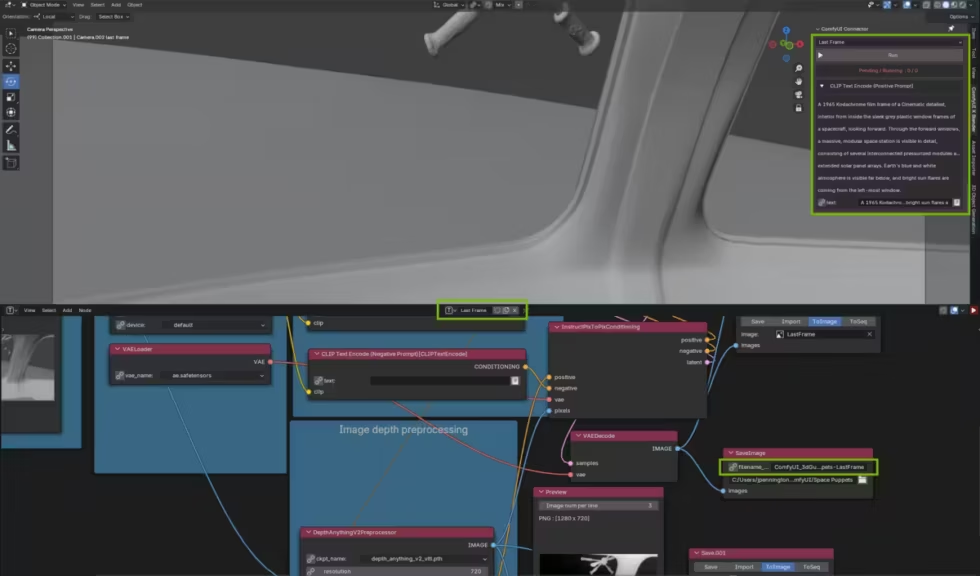
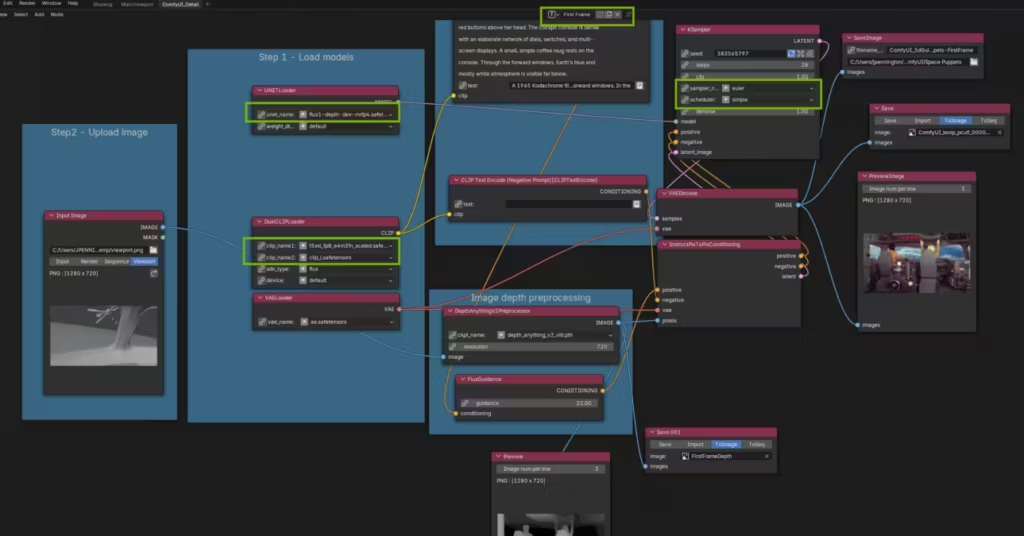
The centerpiece of this integration is the ComfyUI Blender AI Node. This extension transforms Blender into a direct control surface for the AI.
- Instantaneous Feedback: Depth maps generated by Blender’s Eevee or Cycles engines are sent directly to the internal ComfyUI instance without manual file exports.
- Creative Iteration: Creators can manipulate 3D objects or adjust camera paths in real-time and see the AI-generated First and Last frames update almost instantly in a side-by-side view.
- Automated Metadata: The bridge automatically synchronizes camera focal lengths and perspective data, ensuring that FLUX.1 Depth interprets the scene with mathematical precision.
4.2 Neural Upscaling: RTX Video VSR
Generating native 4K video frames locally remains a massive computational bottleneck in 2026. To bypass this, NVIDIA utilizes an “upscale-last” strategy powered by Tensor Cores.
- Strategic Efficiency: The pipeline renders a base clip in 720p or 1080p, then hands off the heavy lifting to the RTX Video Super Resolution (NVFX) node.
- Quality Tiers: By using an Upscale Factor of 3 and Quality Level: Ultra, the system can produce a 4K output that often exceeds the sharpness of native renders while saving significant processing time.
- Internal Link: For a detailed performance analysis and setup guide, see our RTX Video Super Resolution in ComfyUI test.
4.3 Multi-GPU Orchestration
The sheer demand of running a 3D engine and a video diffusion model simultaneously can saturate even a flagship GPU.
- Parallelization: ComfyUI’s architecture allows for task distribution across multiple GPUs.
- Optimized Load: You can dedicate one GPU specifically to Blender’s viewport and depth rendering while a second GPU handles the LTX-2.3 temporal inference.
- Internal Link: Learn how to configure this for your studio in our guide on ComfyUI multi-GPU and network support.
5. Field Reports: Debugging the Experimental Frontier
Despite its “high-resolution” branding, the NVIDIA blueprint is a complex assembly of cutting-edge technologies that remains inherently fragile. For a professional creator, success in 2026 is often a matter of technical troubleshooting rather than artistic flair.
5.1 Mathematical Rigidity: The (N×8)+1 Frame Rule
One of the most frequent points of failure in this pipeline is the mathematical constraint imposed by LTX-2.3.
- The “Black Video” Syndrome: If your frame count does not follow a specific sequence, the VAE decoder often fails, resulting in a corrupted, entirely black video file.
- Exact Multiples: To ensure stability, your total frame count must strictly adhere to values like 65, 97, or 121.
- Crop Guides: Forgetting to place the LTXVCropGuides node before the final decoding stage is another common cause for generation errors.
5.2 Solving the “Last Frame Drift”: The -12 Index Offset
A recurring technical limitation of the LTX-2.3 model is its “temporal amnesia” toward the end of a sequence.
- The Convergence Gap: As the diffusion process progresses, the model often struggles to maintain visual fidelity to the provided “Last Frame” keyframe.
- Technical Fix: By setting the last-frame position index to -12 instead of the default -1, you provide the model with a broader temporal window to converge on your target image.
- Internal Link: For a deeper dive into these specific benchmarks and scheduler optimizations, see our LTX-2 Technical Optimization Guide.
5.3 The Proprietary Lock-in: A Critical Perspective
While the performance gains are undeniable, this workflow represents a significant shift toward a “walled garden” ecosystem.
- OS Dependencies: Crucial nodes like the RTX Video Super Resolution (NVFX) are tied to Windows 11 and NVIDIA’s proprietary drivers, leaving Linux power users at a disadvantage.
- Hardware Gating: The most efficient paths, specifically those utilizing the NVFP4 format, are hardware-locked to the Blackwell architecture.
- Complexity Overhead: the requirement to master Blender, Conda environments, and dense ComfyUI graphs means this pipeline is currently reserved for technical directors rather than generalist artists. To be clear: this is a technology showcase, not a turnkey production tool. Sequence duration, render time, and temporal stability remain hard constraints regardless of hardware tier.
6. FAQ SEO & Conclusion
What is the technical difference between SVD and LTX-2.3?
While Stable Video Diffusion (SVD) remains an efficient baseline for short, abstract motions, LTX-2.3 represents a generational leap in resolution and semantic control. The integration of the Gemma 2B text encoder allows LTX-2.3 to interpret complex physics and synchronized audio cues far better than the CLIP-based architecture of SVD. Furthermore, LTX-2.3 is natively optimized for the “First/Last Frame” workflow, making it the superior choice for directed 3D-to-video pipelines.
Can I run this workflow on an RTX Laptop?
Yes, provided your mobile GPU has at least 12GB of VRAM (e.g., RTX 4080/5080 Laptop). However, be prepared for significant thermal throttling during long LTX-2.3 inference runs. Additionally, the high system RAM demand (minimum 32GB) often requires a manual upgrade on most consumer laptops to avoid swap-file bottlenecks during Blender-ComfyUI synchronization.
Why is FLUX.1 Depth preferred over a standard ControlNet?
FLUX.1 Depth is natively trained to understand 3D spatial geometry rather than just “reading” a 2D depth map as an overlay. This results in fewer artifacts, better occlusion handling, and significantly higher speed when using NVFP4 acceleration on Blackwell architectures. While ControlNet remains a flexible tool for lighter projects, it offers stronger structural consistency in this pipeline provided by FLUX.1 Depth in a full 3D-guided environment.
Is this workflow compatible with AMD or Mac GPUs?
No. The pipeline relies on two NVIDIA-exclusive components: the NVFP4 format for Blackwell-accelerated inference, and the RTX Video Super Resolution SDK for 4K upscaling. While ComfyUI itself is open-source and cross-platform, this specific blueprint is hardware-locked to NVIDIA’s ecosystem. Linux users face an additional constraint: the RTX Video VSR node depends on Windows 11 and NVIDIA’s proprietary driver stack, making it currently unavailable outside that environment.
7. Opinion: The Strategic Shift Toward Hybrid Pipelines
The “RTX AI Video Generation” blueprint is a definitive response to the primary failure of current generative workflows: the lack of spatial intent. If you have spent any significant time in ComfyUI, you already know the frustration of “prompt-engineering” a camera movement or a character’s position, only to have the latent space hallucinate a different reality every five frames.
The brilliance of this workflow is that it acknowledges the inherent chaos of diffusion models and domesticates them using the rigors of 3D geometry. By using Blender as a staging ground, the creator regains the role of Director. You are no longer asking the AI what a scene should look like; you are telling it exactly where the floor is, where the light hits, and how the camera travels.
The Paradox of Choice vs. Control
However, we must remain critical of the “NVIDIA-centric” nature of this solution. While the performance gains from NVFP4 and RTX Video VSR are technically impressive, they create a technological dependency that favors hardware upgrades over algorithmic flexibility. For the professional creator, the trade-off is clear: you accept the proprietary “walled garden” in exchange for a level of visual consistency that was previously impossible in a local, open-source environment.
Conclusion: Toward Directed AI Cinematography
The NVIDIA “RTX AI Video Generation” blueprint is not a “magic button” for video creation. It is a high-level technical framework that redefines how generative video should be approached. By shifting the center of gravity toward 3D-driven control, it provides a concrete answer to one of the most persistent limitations of diffusion models: the lack of spatial intent.
By using Blender as a staging environment, creators regain authorship over composition, camera movement, and scene structure. AI is no longer asked to invent a scene from scratch, but to execute within a defined geometric context. This marks a clear transition from generative randomness to directed AI cinematography.
However, this power comes with trade-offs. The workflow remains complex, hardware-intensive, and partially locked into NVIDIA’s ecosystem, particularly when leveraging optimizations such as NVFP4 and RTX Video VSR. It requires a dual mastery of 3D environments and node-based AI orchestration, placing it firmly in the domain of technical creators.
For those willing to embrace this complexity, the payoff is substantial: a level of control, consistency, and visual direction that was previously unattainable in local AI video workflows. More importantly, this blueprint outlines a broader industry trajectory — one where hybrid pipelines, combining structured 3D environments and generative models, become the foundation of next-generation content production.
Resources & Further Reading
To deepen your understanding of NVIDIA’s 3D-to-diffusion pipeline and experiment with real implementations, here are the most relevant technical resources:
Official NVIDIA resources
- NVIDIA RTX AI Video Generation Guide https://www.nvidia.com/en-us/geforce/news/rtx-ai-video-generation-guide/
- NVIDIA 3D Guided Generative AI Blueprint (GitHub) https://github.com/NVIDIA-AI-Blueprints/3d-guided-genai-rtx
- NVIDIA 3D Object Generation Blueprint https://github.com/NVIDIA-AI-Blueprints/3d-object-generation
Reference workflows
- ComfyUI LTX-2.3 + RTX Video Super Resolution example workflows https://github.com/NVIDIA-AI-Blueprints/3d-guided-genai-rtx/tree/main/example_workflows
Core tools
- Blender (3D environment used for spatial control) https://www.blender.org/
These resources provide both conceptual understanding and practical implementations of the pipeline described in this article.
Your comments enrich our articles, so don’t hesitate to share your thoughts! Sharing on social media helps us a lot. Thank you for your support!