Complete guide to ComfyUI upscale models: performance and use cases
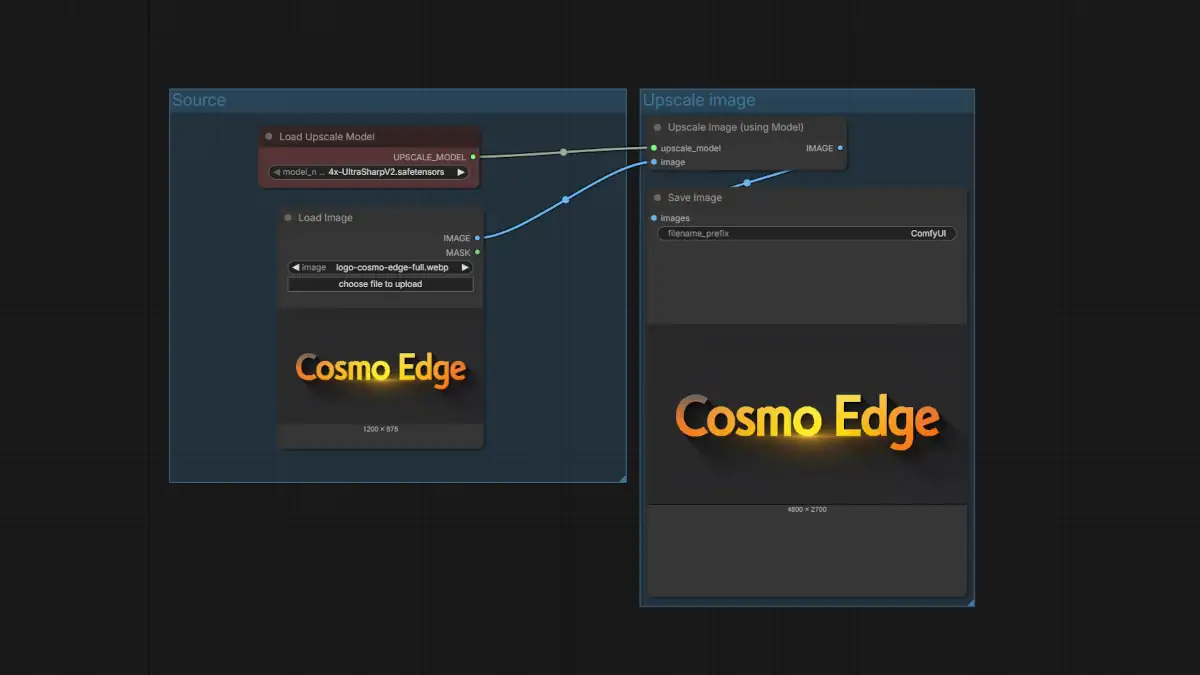
Optimizing images in ComfyUI relies on a precise selection of upscale models, as each architecture, whether ESRGAN-based or more recently DAT-based, interacts differently with pixels and textures. To integrate these tools, files (mainly in .pth format) must be placed in the ComfyUI/models/upscale_models directory.
Comparative table of upscale models
This table summarizes the characteristics of the most powerful models to help you choose the one that matches your source image.
| Model | Ideal image type | Rendering style | Artifact management | Sharpness | Recommended use |
| 4x-ESRGAN | Mixed / general | Neutral | Medium | Good | Versatile base |
| RealESRGAN_x4plus | Degraded realistic photo | Restorative | Excellent | Moderate | Compressed photos, noise |
| 4x-UltraSharp | Anime / digital art | Highly sharpened | Low | Very high | Line-art, illustrations |
| 4xNomos2 | Clean realistic photo | Natural | Good | High (soft) | Portraits, SDXL renders |
| 4xNomosWebPhoto | Damaged web photo | Soft restorative | Very good | Medium | Compressed web images |
| 4xNomos8kDAT | HD photo / print | Very natural | Good | Balanced | High-resolution upscale |
Recommended choices by ComfyUI workflow
The choice of model must align with the generation or capture source to ensure a professional result.
SDXL workflow (realistic rendering)
The goal here is to preserve texture consistency without causing over-sharpening.
- Recommended: 4xNomos2 as the first choice for its softness, followed by 4xNomos8kDAT.
- To avoid: 4x-UltraSharp, which tends to over-process skin pores and micro-textures.
Flux workflow (illustration and semi-realistic)
For modern models like Flux, the aim is clean detail without distorting the artistic style.
- Recommended: 4x-UltraSharp for impactful illustrations, or 4xNomos2 if the render leans toward photorealism.
- Pro tip: Use UltraSharp with a light denoise step beforehand if halos appear.
Real photography and restoration
For shots from smartphones or the web, the priority is noise suppression.
- Recommended: RealESRGAN_x4plus remains the gold standard, complemented by 4xNomosWebPhoto for lighter compression issues.
Anime and Line-art
The objective is to achieve crisp lines and high contrast.
- Recommended: 4x-UltraSharp is the industry standard, followed by anime-specific ESRGAN variants.
- To avoid: RealESRGAN_x4plus, which tends to overly smooth characteristic drawing strokes.
Print and high resolution (A3, posters)
For printing, the image must look natural at 100% zoom.
- Recommended: 4xNomos8kDAT is the premium choice for its handling of fine details.
- Warning: Strictly avoid UltraSharp for printing, as its sharpening artifacts become very visible on paper.
FAQ on installation and usage
Where can I find the essential download links?
The most reliable sources are Civitai for UltraSharp, OpenModelDB for classic ESRGAN models, and Hugging Face for the Nomos series.
How do I integrate these models into my nodes?
Use the Load Upscale Model (or UpscaleModelLoader) node to load your .pth file. Then connect it to the Upscale Image (using model) node after your Load Image or VAE Decode node.
Why prefer 4xNomos2 for a clean photo?
Because it is less aggressive than RealESRGAN. It respects the natural grain of the source image instead of trying to erase it, offering a sense of “clarity” rather than “cleaning.”
With the massive arrival of Transformer-based architectures like the DAT format, we are moving toward a future where upscaling will no longer just process pixels, but reconstruct images with a total semantic understanding of their content. Would you be ready to trust the reinterpretation of your finest details to these new algorithms?
Your comments enrich our articles, so don’t hesitate to share your thoughts! Sharing on social media helps us a lot. Thank you for your support!