Xcode 26.3 and MCP: Apple’s strategic pivot toward agentic IDE architecture
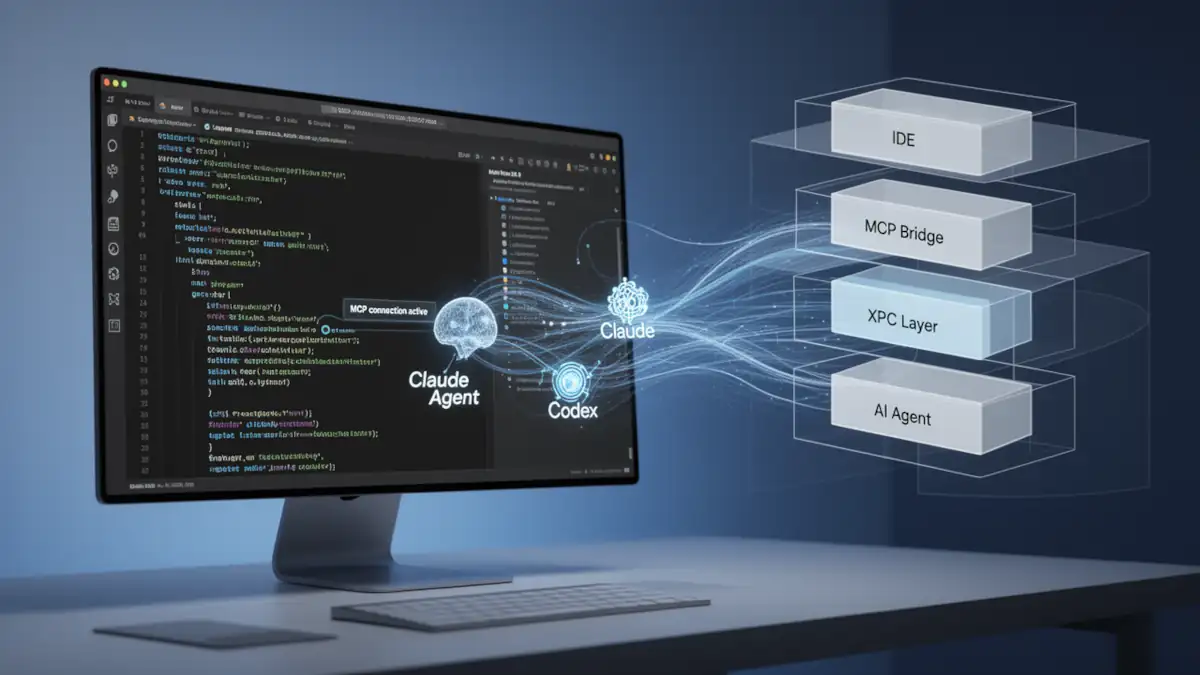
Apple has traditionally maintained Xcode as a closed ecosystem, requiring developers to operate strictly within its proprietary workflows. However, the release of Xcode 26.3 introduces a calculated fracture in this “walled garden” philosophy. By implementing native support for the Model Context Protocol (MCP), Apple is transitioning Xcode from a static development environment into a high-performance hub for agentic coding.
This update allows third-party AI agents, such as Claude Agent and OpenAI’s Codex, to interface directly with Xcode’s internal toolset. This move is less about relinquishing control and more about standardizing how AI interacts with local development environments.
The technical backbone: xcrun mcpbridge
The architectural centerpiece of this integration is mcpbridge, a utility bundled with Xcode’s command-line tools. It serves as a translation layer between the standardized MCP (Model Context Protocol) and Apple’s internal XPC communication framework.
Communication flow
- External Agent: Tools like Claude Code or Cursor communicate via the MCP protocol using standard I/O (stdio).
- MCP Bridge: The mcpbridge binary translates these requests into XPC calls to interface with Xcode’s internal layer.
- Xcode Kernel: Xcode receives the translated instructions and executes them within the project context.
- Security & Visual Cues: Xcode must be running with an active project. A visual indicator appears in the UI whenever an external agent is connected to ensure transparency and prevent unauthorized background access.
For a deeper dive into how these protocols are being secured across the industry, see our analysis on securing agentic AI and the MCP ecosystem.
Native agent integration: Claude and Codex
Apple has co-designed these integrations with Anthropic and OpenAI to ensure token efficiency and stable tool interfaces.
- Claude Agent: Developers can now leverage Claude’s advanced reasoning for complex tasks like project-wide refactoring, sub-agents, or background tasks directly within Xcode. You can consult our comparative of AI agents in the command line to see its performance.
- OpenAI Codex: Following its production release at OpenAI DevDay 2025, Codex is now natively accessible in Xcode.
Exposed toolset: 20 MCP-enabled capabilities
Xcode 26.3 exposes 20 specific tools to any connected MCP client, allowing agents to perform autonomous actions:
| Category | Key Tools | Functionality |
|---|---|---|
| Workspace | XcodeListWindows | Discovers active workspace paths and tab identifiers. |
| Build & Test | BuildProject, RunAllTests | Allows agents to trigger compilations, read logs, and verify logic. |
| Intelligence | DocumentationSearch, RenderPreview | Semantic search via “Squirrel MLX” and visual verification of UI. |
| File System | XcodeRead, XcodeWrite, XcodeGlob | Full CRUD operations on files and project structure. |
Advanced agentic workflows
Two tools specifically redefine the developer-AI relationship:
- RenderPreview: This allows an agent to “see” SwiftUI previews by capturing screenshots. An agent can modify a view, render the preview, and verify the visual output before committing code.
- DocumentationSearch: Powered by “Squirrel MLX”—Apple’s MLX-accelerated embedding system—this tool queries the entire Apple documentation corpus and WWDC transcripts. It provides agents with technical context from iOS 15 through iOS 26.
Limitations and documented bugs
Despite the strategic importance of this release, early adopters should be aware of technical friction points.
- The MCP spec mismatch: Currently, mcpbridge returns data in the content field but fails to populate structuredContent. While Claude and Codex handle this via custom integrations, stricter clients like Cursor may reject these responses as non-compliant (Error -32600).
- Operational risks: Transitioning to “vibe coding” increases the risk of agentic failures and loops, where agents may burn tokens attempting to solve hallucinated build errors or security flaws.
- Sandbox constraints: While agents have broad access, they remain subject to Apple’s sandboxing and explicit user permissions. Activation must be toggled manually in Settings > Intelligence.
Strategic impact for the iOS ecosystem
The adoption of MCP by Apple confirms that the future of software development is not just AI-assisted, but AI-orchestrated. By providing a standardized interface, Apple is encouraging a new class of AI coding agents that operate beyond mere benchmarks.
FAQ
How do I enable MCP in Xcode 26.3? Open Xcode Settings (⌘,), go to the Intelligence section, and toggle Xcode Tools to ON under Model Context Protocol.
Can I use Cursor with this new bridge? Yes, though Cursor follows the MCP spec strictly. You may need a Python wrapper to bypass the structuredContent bug present in the current RC version.
What is Squirrel MLX? It is Apple’s proprietary MLX-accelerated embedding system used for local, semantic search of documentation and video transcripts.
Your comments enrich our articles, so don’t hesitate to share your thoughts! Sharing on social media helps us a lot. Thank you for your support!