RTX Video Super Resolution in ComfyUI: Neural Upscaling at the Service of Creative Workflow

The challenge of scaling in artificial intelligence workflows has long relied on a frustrating compromise between execution speed and visual fidelity. Traditionally, ComfyUI users had to choose between resource-hungry diffusion models and sometimes destructive post-processing algorithms. The recent arrival of the official NVIDIA RTX Video Super Resolution (VSR) node for ComfyUI marks a strategic turning point: the integration of a professional video processing pipeline directly within the generative canvas.
Rather than being a simple post-process filter, RTX VSR establishes itself as a dedicated neural component capable of transforming creator productivity. By leveraging the power of modern architectures, this node allows users to break free from the usual slowness of upscaling to focus on the quality of the final production. To understand its foundations, it is useful to refer to the evolution of scaling technologies like Nvidia DLSS: operation and history.
1. Understanding Upscaling in the ComfyUI Ecosystem
In the nodal architecture of ComfyUI, resolution enhancement is generally divided into two distinct categories. On one hand, Latent Upscale occurs before VAE decoding; it is inherently creative because it asks the model to “reimagine” the image at a higher scale, which can lead to anatomical or stylistic drift. On the other hand, Model Upscale (or Pixel Upscale) acts on the decoded image using specialized neural networks like SwinIR or the ESRGAN family.
This is where the limits of traditional methods appear, especially when processing video or high-frame-rate streams. Conventional models were often trained on static images and can struggle to maintain texture consistency or process compression artifacts without introducing excessive smoothing. The need for a solution capable of processing the signal with “video” rigor while remaining performant led to the adoption of VSR. For a deeper dive into these distinctions, see the Complete guide to ComfyUI upscale models: performance and use cases.
2. How Does RTX Video Super Resolution Actually Work?
Contrary to popular belief, RTX Video Super Resolution is not a simple pixel interpolation algorithm driven by the driver. It is a proprietary neural upscaling model, specifically optimized to run on the Tensor Cores of NVIDIA GPUs. Natively integrated into the video pipeline, it combines artificial intelligence and signal processing to accomplish three critical missions:
- Intelligent Upscaling: Increasing pixel density while preserving edge clarity.
- Artifact Reduction: Elimination of “blocking” (compression blocks) and “ringing” (visual echoes around edges).
- Structure Reconstruction: Improving overall sharpness without inventing new semantic elements.
The fundamental difference from a model like ESRGAN lies in its philosophy: where a generative model might “hallucinate” non-existent skin pores or fabric fibers, VSR focuses on restoring real structures and signal cleanliness. It is a surgical precision tool that draws its strength from the RTX Video SDK Nvidia.
3. Benchmark Methodology: The Duel
To evaluate the real-world performance of the RTX Video Super Resolution (VSR) node, we established a testing protocol. The goal is to compare the efficiency of neural hardware processing against classic software-based inference.
- Hardware Used: NVIDIA RTX 5090 with 32 GB of VRAM.
- Software Environment: ComfyUI (2026 version), integrating the official Nvidia_RTX_Nodes_ComfyUI.
- Reference Image: A photorealistic generation produced with the FLUX.2 Dev FP8 model at a native resolution of 1280×720.
- Comparative Model: RealESRGAN_x4plus, the current standard for precision upscaling in the AI community.
- Test Parameters: x4 scaling with the “Quality=Ultra” setting for VSR.
The use of the FP8 format for the source is strategic here. While performant, this format can introduce slight quantization artifacts that the upscaler must handle without unnecessary amplification. For more details on format impacts, see our dossier: ComfyUI: which format to choose BF16, FP16, FP8 or GGUF?.

(Click to enlarge)
4. Results: RTX VSR vs. RealESRGAN_x4plus
Measurements performed on the RTX 5090 highlight a major technological breakthrough in both velocity and structural fidelity.
Raw Performance Analysis
| Characteristic | RTX Video Super Resolution (Ultra) | RealESRGAN_x4plus |
|---|---|---|
| Rendering Time (x2) | 0.99 second | N/A (native x4 model) |
| Rendering Time (x4) | 1.86 seconds | 3.13 seconds |
| VRAM Consumption | Negligible (Driver Buffer) | Model loading (~1-2 GB) |
The hardware node shatters speed records with a productivity gain of approximately 40% compared to RealESRGAN. This responsiveness is a critical asset for video workflows where every frame counts.


(Click to enlarge)
Qualitative Analysis: Fidelity vs. Interpretation
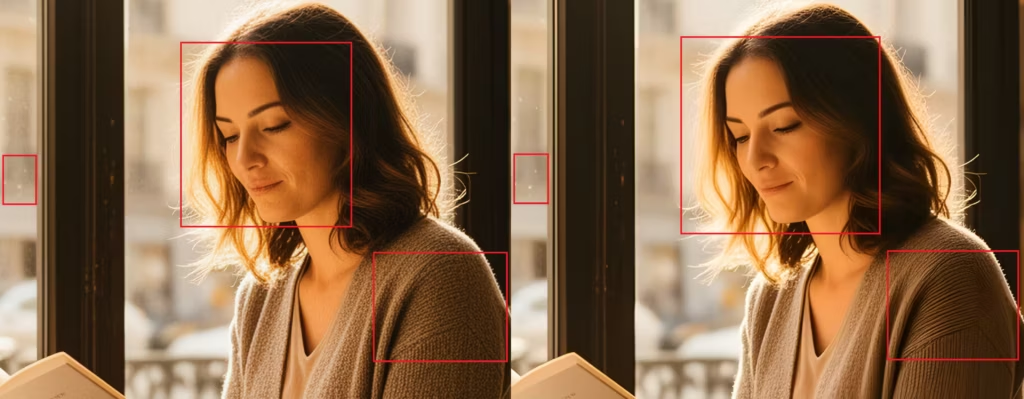
100% zoom observation reveals two opposing philosophies:
- RTX VSR (Faithful Reconstruction): The model acts like a high-definition mirror. It preserves all elements of the source image without any distortion. Complex textures, such as a sweater’s knit, maintain their structural integrity. However, its precision is such that it can amplify noise if present in the source.
- RealESRGAN (Aesthetic Interpretation): This model applies characteristic smoothing. While it effectively eliminates streaks on glass or skin imperfections, it does so at the cost of a slightly “plastic” look. Some fine details are transformed or simplified by the software denoising process.
In short, VSR prioritizes signal truth whereas RealESRGAN prioritizes visual cleanliness.


5. Use Case Analysis: When to Choose VSR?
The choice between RTX Video Super Resolution and a classic model depends less on the target resolution and more on the nature of your project. Thanks to its real-time execution on Tensor Cores, VSR excels in scenarios where fidelity and fluidity are non-negotiable.
- Video Workflow and Animation (LTX-Video): The major advantage of VSR lies in its temporal consistency. Unlike image-by-image upscale models that can generate flickering, VSR processes the signal stably, making it ideal for AI-generated sequences.
- Cleaning Up Fast Generations: For users leveraging quantized models like FLUX.2 Dev FP8, VSR effectively compensates for quantization artifacts without the overhead of a second diffusion pass.
- Mass Production: In an industrial pipeline where hundreds of images must be processed, the cumulative time savings (1.86s vs. 3.13s) become a major profitability factor.
For more specific creative reconstruction needs, you can consult our guide on HiDream-I1-Dev ComfyUI: optimal latent upscaling guide.
6. Recommended ComfyUI Workflow: The Hybrid Pipeline
To get the most out of your GPU, we recommend a workflow structure that delegates each task to the most efficient tool. The idea is to use the generative power of FLUX for intent and the precision of VSR for definition.
Standard Structure
- Generation: Create the image at a lower resolution (e.g., 720p or 1080p) to save sampling time.
- VAE Decode: Transition from the latent domain to the pixel domain.
- RTX VSR Upscale: Immediate scaling to 4K with the Quality=Ultra setting.
- Optional – Refinement (RealESRGAN): Only if the original source was excessively noisy, a light pass via RealESRGAN can serve as a final smoothing filter.
Tip: Do not try to “push” denoising in the prompt if you are using VSR. Let the model generate a natural texture; the NVIDIA node will handle magnifying it without distortion.
7. Technical Limits and FAQ
Despite its performance, RTX VSR imposes certain constraints linked to its hardware architecture.
- Hardware Exclusivity: The node strictly requires an NVIDIA GPU from the Ampere (30xx), Ada Lovelace (40xx), or Blackwell (50xx) generations. Tensor Cores are indispensable for running the VSR neural model.
- Source Quality: Since VSR is an “amplifier of truth,” it will not fix a bad prompt or a blurry image. It will make the blur sharper, but it won’t transform it into detail.
- VRAM Optimization: On cards with limited memory, using VSR is a lifesaver because it does not require loading massive upscale models into video memory. To properly calibrate your usage, read ComfyUI: choosing the right model size for your VRAM.
Conclusion and Perspectives
The integration of RTX Video Super Resolution into ComfyUI marks the end of an era where high-quality upscaling was necessarily synonymous with slowness. For owners of the RTX 50, this node transforms a once-heavy task into a simple technical formality taking less than two seconds (RTX 5090).
The verdict is clear: if your priority is productivity and absolute fidelity, NVIDIA’s hardware solution is unbeatable. It respects the original structure of textures—from fabric knits to skin details—where models like RealESRGAN tend toward a sometimes artificial aesthetic simplification. However, this power imposes a constraint: the need to produce flawless source images, as RTX VSR does not forgive digital noise.
The future of upscaling in ComfyUI seems to be heading toward these hybrid flows, clearing the way for finally fluid 4K video creation. A future addition of technologies like Nvidia DLSS 4.5 could further push the boundaries of real-time frame generation.
Your comments enrich our articles, so don’t hesitate to share your thoughts! Sharing on social media helps us a lot. Thank you for your support!