ComfyUI GGUF: how and why to use this format in 2026?

The year 2026 marks a turning point where the GGUF format is no longer an experimental alternative, but an absolute necessity for anyone wishing to exploit cutting-edge models, such as Flux 2 or Wan 2.2, on consumer-grade hardware. Initially reserved for text models, this format has established itself in image and video generation thanks to its ability to divide video memory (VRAM) usage while maintaining professional visual quality.
Why GGUF remains the standard for local optimization
The massive adoption of GGUF is based on technical benefits that have redefined the use of local AI, particularly for configurations with 6GB to 16GB of VRAM:
- Massive VRAM savings: Quantization (notably in Q4 or Q8) allows for reducing memory usage by up to 80% compared to the traditional FP16 format.
- Democratization of massive models: Thanks to GGUF, it is now possible to run models exceeding 12 billion parameters on consumer graphics cards.
- Speed and efficiency: As reported by the community wiki, GGUF models load between 2 and 5 times faster than their .safetensors equivalents.
GGUF vs. NVFP4: which optimization to choose for your GPU?
In 2026, the ecosystem is fragmenting according to your hardware architecture, offering two distinct paths for optimization:
- The GGUF format for versatility: It remains the reference solution for RTX 30 and 40 series, benefiting from a massive catalog of pre-quantized models.
- The emergence of NVFP4 for RTX 50: According to NVIDIA reports, this format is specifically optimized for Blackwell architectures. While still in the “early adopter” phase, it already allows for freeing up to 60% of VRAM and increasing calculation throughput by 3 to 4 times on compatible models.
Practical guide: configuring GGUF with ComfyUI Desktop
Installation has been simplified by the evolution of official tools and the Nodes 2.0 interface:
- Installation via ComfyUI-Manager V2: Use the new secure interface to install the ComfyUI-GGUF node, as this manager now blocks high-risk system features by default.
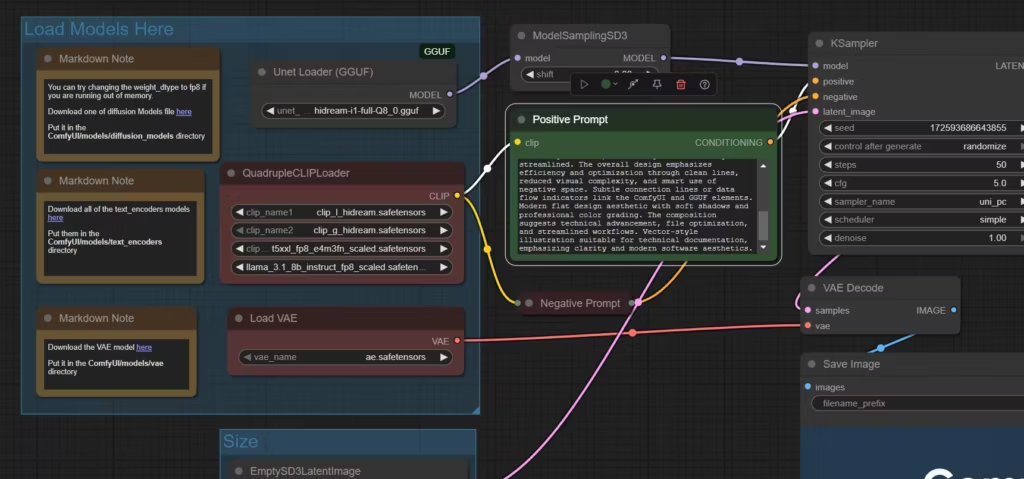
- File organization: As specified in the community manual, place your .gguf files in models/unet for diffusion models or models/clip for quantized text encoders.
- Using “Loader” nodes: Replace your classic loaders with Unet Loader (GGUF) and DualCLIPLoader (GGUF) nodes to activate quantization management in your workflow.
Use cases: optimizing Flux 2 and high-fidelity video
The value of GGUF is fully realized with the most recent and demanding models:
- Flux 2 Dev GGUF: This format allows for loading the Open Weights version of Flux 2 on mid-range GPUs thanks to optimized compression.
- The video revolution with Wan 2.2 and HunyuanVideo-1.5: According to technical analyses, using GGUF combined with Temporal Rolling VAE allows for generating high-fidelity clips with high temporal consistency without memory saturation errors.
- Growing support for NVFP4: According to Microsoft and NVIDIA, models like LTX-2, Qwen-Image, and FLUX.1/2 already have NVFP4 checkpoints on Hugging Face, paving the way for 4K generation on home PCs.
Quality and precision: the contribution of dynamic quantization
Fears of quality loss due to compression have now been addressed, as reported by community technical monitoring. The dynamic quantization method from Unsloth minimizes precision loss, making Q8 results almost identical to the reference FP16 version. In 2026, the consensus is clear: Q4 offers extreme performance for prototyping, while Q8 ensures optimal visual fidelity for final production.
| Criteria | Classic .safetensors | Quantized .gguf |
|---|---|---|
| Model size | High (FP16/BF16) | Up to –80% with Q4–Q8 |
| VRAM usage | Heavy (24–48 GB for 13B) | Reduced (6–8 GB for 13B) |
| Loading time | Moderate | 2–5x faster |
| Image quality | Reference | Close to FP16, minimal loss in Q8 |
| Availability | Wide base | Requires GGUF extension |
Optimization: the new heart of local creation?
This trend toward lighter and more efficient models raises questions about the future of hardware and, more broadly, the local use of generative AI. Will we soon see the execution of peak performance models on our personal computers or workstations in a completely transparent way? For beginners, experts, developers, or even creative studios, I recommend reading our guide ComfyUI: best information sources and ecosystem resources, as the ecosystem is evolving fast and so are creation methods.
Your comments enrich our articles, so don’t hesitate to share your thoughts! Sharing on social media helps us a lot. Thank you for your support!