Upscaling MiniMax H3 to 2K in ComfyUI: 5 Methods Tested on an RTX 5090

MiniMax H3’s open weights stop at 768p, and MiniMax’s own 2K output is already an upscale. So can you get a clean 2K video locally? I put five methods to the test in ComfyUI, on the same clip, with the same seeds and the same output settings: two latent upscale chains, two dedicated “regenerate” refiners, and Nvidia’s RTX Video Super Resolution.
This article explains what each method does and how the test was run. The results, side by side, are in the video.
Why upscale MiniMax H3 at all?
The only MiniMax H3 version you can download, H3-Base, generates at 768p: about 1344×768 in 16:9. That’s fine for a preview, but soft on a 1440p or 4K screen, and small text suffers first.
The interesting part is how MiniMax itself does it. Its hosted 2K output is not a native 2K generation: the H3-Regenerate-2K service takes the 768p render and regenerates it at a higher resolution. There is no official 4K tier. So the question is not “can H3 do 2K?”, it is “can we reproduce that second pass locally, and which way works best?”
Latent or pixels: two families of upscaling
Latent upscaling works on the model’s compressed internal representation, the latent, before it is decoded into frames. You enlarge the latent, then run a short refine pass so the model can redraw the detail that the enlargement could not create. This can add genuine new detail, but every redraw is also a chance to drift away from the original.
Pixel upscaling works on the finished video. It sharpens and enlarges what is already in the frames. It cannot invent anything, which makes it predictable, but it also means it cannot add detail that was never there.
The test compares both families on the same draft.
The test setup
The test clip is a five-second MiniMax H3 text-to-video-with-audio generation: a woman talking to camera in front of a bakery window. I packed six pieces of text into the frame, from large to tiny: a shop sign, a neon, a chalkboard, a menu, a street sign and a small phone number. Faces and lip sync are hard to keep through an upscale. Small text is harder, and it is easy to check.

The rules:
- Every method starts from the same draft, generated once with fixed seeds.
- Same target for all: 2560×1440.
- Same encoding for all outputs: H.264, CRF 10, with the draft’s audio.
- The latent methods all decode with the same int8 video VAE.
- On the same frame (frame 60), I count how many of the six texts are still readable, and check that no method shifts the pose or framing.
- I also note render time and how much memory each method needs.
| Setting | Value |
|---|---|
| GPU | RTX 5090 (32 GB) |
| RAM | 64 GB |
| Software | Windows 11, ComfyUI Desktop 0.45.4 |
| Draft | T2VA, 1344×768, 124 frames, 24 fps |
| Target | 2560×1440, H.264 CRF 10 |
This is a first test on a single clip, not a full benchmark. A clip with camera motion and fine textures could tell a different story.
The five methods
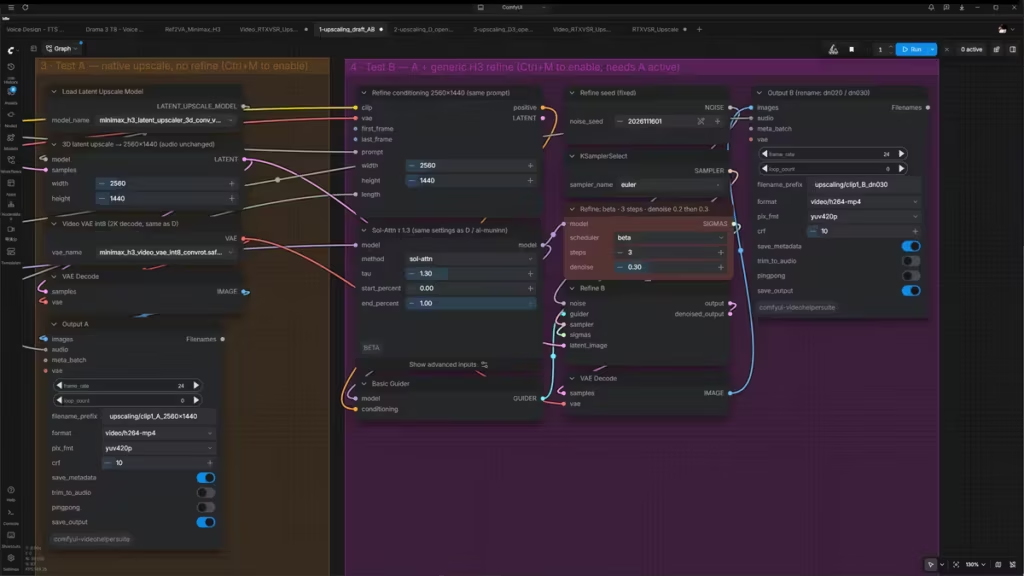
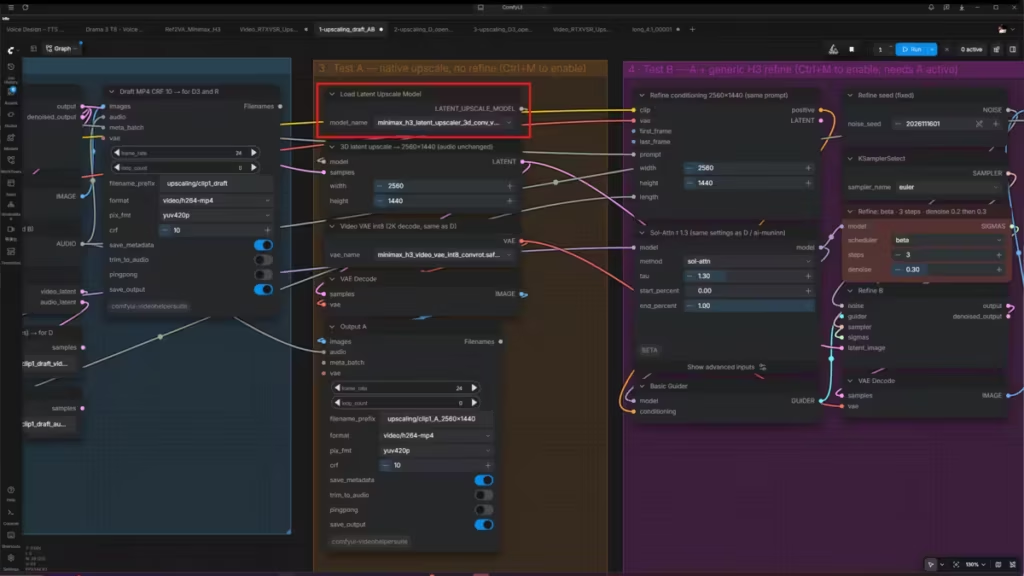
A — Native latent upscale, no refine
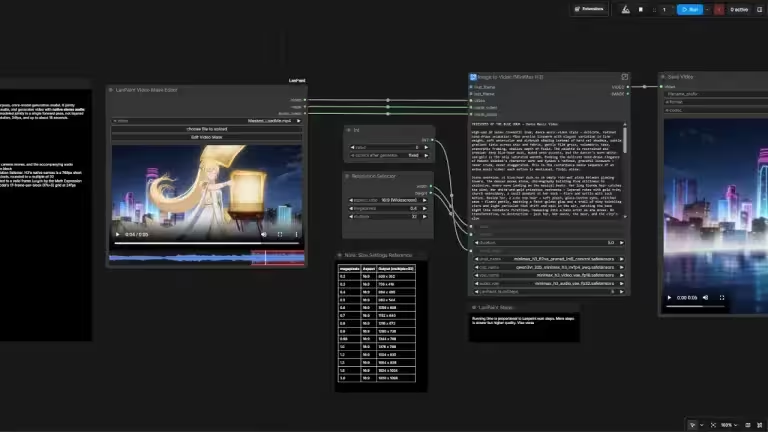
ComfyUI now ships native nodes for this: Load Latent Upscale Model and MiniMax H3 Latent Upscale With Model. They load a small community-trained upscaler (the 3D-conv model by LBH-123-AI, Apache-2.0) and enlarge the latent directly, with no custom node. Method A stops there: enlarge, then decode. It’s the baseline that shows what an upscale does on its own.
B — Native latent upscale + generic refine
B adds a refine pass with the regular MiniMax H3 model: the enlarged latent gets a little noise back, and the model cleans it up in three steps (Euler, beta scheduler). The key setting is denoise, how much of the image the model is allowed to redraw. No official value is published for this, so I tested 0.2 and 0.3.
D — Open-H3 Regenerate 2K, version one
An open refiner built specifically to take H3 drafts to 2K. Same principle as B, re-noise the draft and redraw it, but with a dedicated LoRA trained for that job. The full version is too big for a 32 GB card, so I used father558’s compressed r128 conversion and the RTX 5090 workflow published by ai-muninn, adapted to reload the shared draft. The key setting is the starting noise level (sigma): I tested the original three-step schedule (0.909 → 0) and a single gentler step (0.667 → 0).
D3 — Open-H3 Regenerate 2K IC, version two
Released on November 9, 2026, version two works differently. Instead of adding noise to the draft and painting over it, it keeps the draft clean as an in-context reference, and generates the high-resolution video next to it from noise. Its stated goal is fidelity: faces, lip sync and text. I ran it in up3 mode with Kijai’s lightweight rank-21 LoRA (about 200 MB) and slmonker’s ComfyUI nodes, adapted for the RTX 5090.
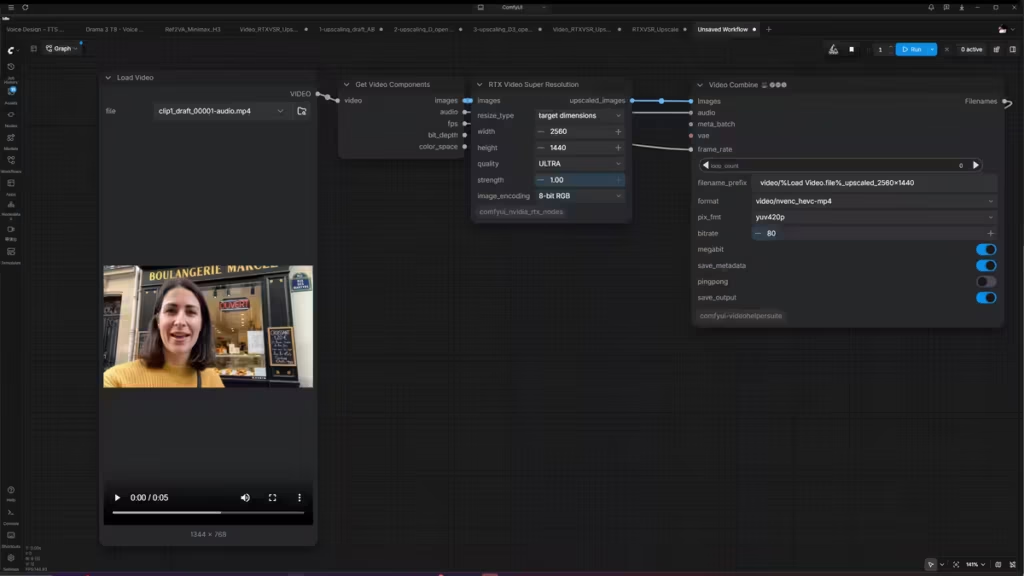
R — RTX Video Super Resolution
Nvidia’s RTX Video Super Resolution, available as a ComfyUI node. It doesn’t touch the latent at all: it takes the finished 768p video and upscales the pixels, at ULTRA quality. No diffusion, no new detail.
| Method | Family | Works on | Main setting tested |
|---|---|---|---|
| A | Latent | Latent | none (upscale only) |
| B | Latent | Latent | denoise 0.2 / 0.3 |
| D | Latent | Latent | sigma 0.909 (3 steps) / 0.667 (1 step) |
| D3 | Latent | Draft video, re-encoded | mode up3 |
| R | Pixel | Finished MP4 | ULTRA quality |
What decides the winner
Five methods, four questions:
- Text: how many of the six texts survive, down to the street sign and the phone number?
- Fidelity: does the upscale stay true to the draft, or does it redraw faces and letters?
- Time: how long does each method take on an RTX 5090?
- Memory: which methods fit in 32 GB, and which spill over into system RAM?
The answers don’t all point the same way, and one of them is not what I expected. The full comparison, with 100% crops on the same frame and the final ranking, is in the video.
This is a first test on a fast-moving topic, and these workflows can surely be tuned further. If you get better results with other settings, I’d like to hear about them. A part two could cover a clip with camera motion and fine textures, version two timed with and without Sol attention, and 4K. Is 4K actually useful for you? Tell me in the video’s comments.
Links and licences
- MiniMax H3 weights for ComfyUI (Comfy-Org)
- MiniMax H3 latent upscaler (LBH-123-AI)
- MiniMax H3 Latent Upscale With Model (ComfyUI docs)
- Open-H3-Regenerate-2K
- H3-Open-Regenerate-2K-ComfyUI-r128 (father558)
- Open-H3-Regenerate-2K on an RTX 5090 (ai-muninn)
- Open-H3-Regenerate-2K-IC
- ComfyUI-OpenH3Regenerate2KIC (slmonker)
- MiniMax-H3-experimental (Kijai)
- Custom node for method D, T8mars/comfyui-minimax-h3-audio-T8
- RTX Video Super Resolution node (Nvidia VFX Nodes)
Licences, as checked on November 16, 2026:
| Component | Licence |
|---|---|
| MiniMax H3 | MiniMax H3 Community License |
| Open-H3-Regenerate-2K (v1) | MiniMax H3 Community License |
| Open-H3-Regenerate-2K-IC (v2) | Not published at the time of testing. The IC node author states derivatives remain under the MiniMax H3 Community License; node code under Apache-2.0 |
| LBH latent upscaler | Apache-2.0 |
The test clip and the video’s voice-over are AI-generated.
Your comments enrich our articles, so don’t hesitate to share your thoughts! Sharing on social media helps us a lot. Thank you for your support!