Controlling Time: Master Prompt Relay in ComfyUI with LTX 2.3
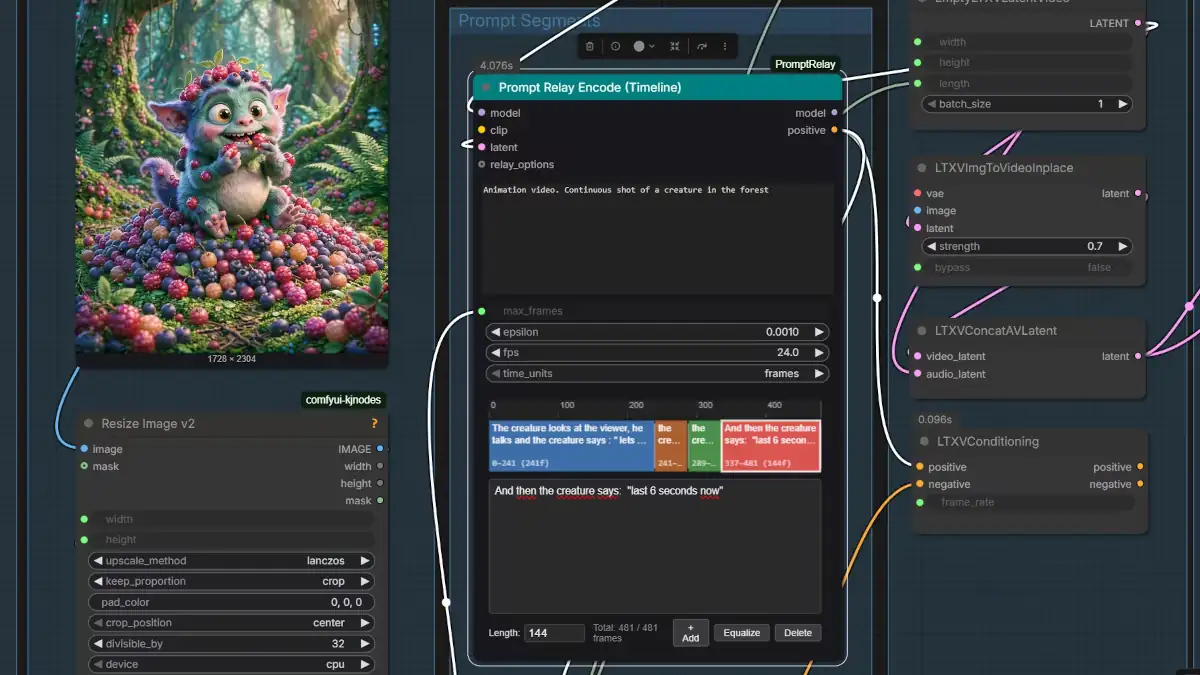
In this guide, we will show how to use ComfyUI Prompt Relay with LTX 2.3 to gain precise temporal control over AI video generation.
Temporal Entanglement in Video Diffusion
Video diffusion models have achieved remarkable progress in generating high-quality videos. However, these architectures fundamentally struggle to represent the temporal succession of multiple events in real-world videos. They lack explicit internal mechanisms to control exactly when semantic concepts appear, how long they persist, and the precise order in which sequential events occur.
This structural limitation becomes a critical bottleneck for movie-grade synthesis, where coherent storytelling depends entirely on precise timing, duration, and seamless transitions between events. When using a single paragraph-style prompt to describe a sequence of complex events, models often exhibit severe temporal entanglement. In this state, semantic data intended for different moments bleed into one another, resulting in catastrophic text-video alignment failures where actions occur out of order or blur together.
[ Traditional Prompting ] -> Amorphous Prompt Block -> Semantic Bleeding across Timeline
[ Prompt Relay Line ]     -> Routed Sub-Prompts     -> Surgical Frame-Level Alignment
The underlying issue is that standard cross-attention mechanisms distribute prompt tokens uniformly across the entire temporal latent space. Without explicit spatial-temporal boundaries, the model cannot distinguish between an action intended for the first two seconds and an action meant for the final frame, transforming what should be a chronological sequence into a chaotic semantic soup.
Demystifying Prompt Relay: Architecture and Core Logic
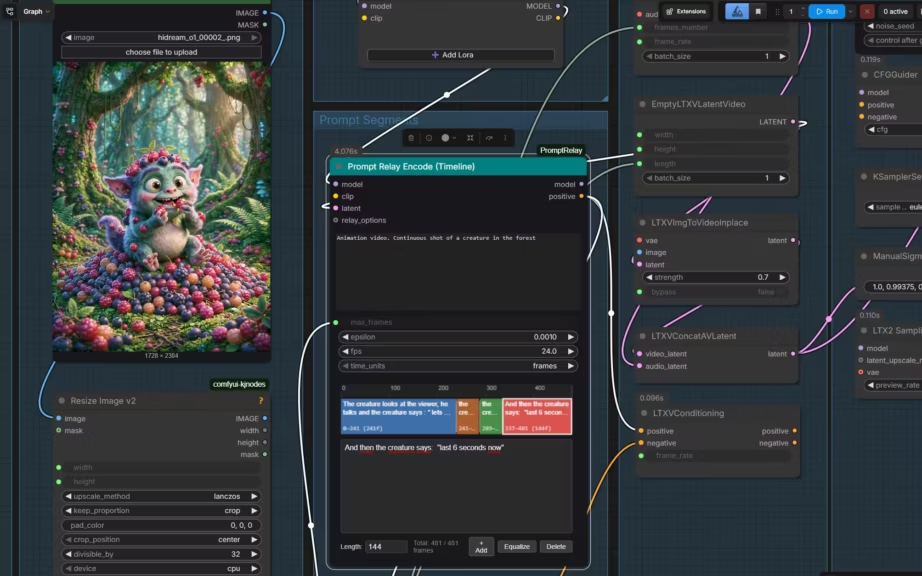
To solve this architectural limitation without the massive computational overhead of fine-tuning or training new structural adapters, Prompt Relay introduces an inference-time, training-free, plug-and-play method for fine-grained temporal control. Instead of forcing the model to guess when an action should take place, this approach surgically routes each textual instruction to its intended temporal segment.
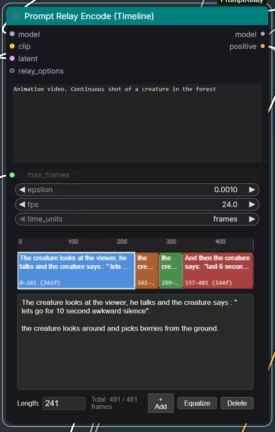
(Click to enlarge)
The core mechanism relies on modifying the cross-attention layers directly during the denoising process. By applying a distance-based penalty to the attention matrices, the system dampens the influence of specific text tokens on frame latents that fall outside the designated time frame.
[Frame Index Timeline] 000-------------------240-------------------480
Master Prompt:         ================================================
Sub-Prompt 1:          [   Active Zone    ]
Sub-Prompt 2:                               [   Active Zone    ]
This dual-layer logic divides your instructions into two distinct components:
- The Master Prompt: Establishes the global canvas. It defines the environment, camera style, lighting, and core subject to ensure unwavering spatial and stylistic coherence across the entire generation.
- The Sub-Prompts: Functions as localized temporal injections. Bound to explicit frame indices, they dictate micro-actions, expressions, or dialogue cues, forcing the model’s focus to shift dynamically as the timeline advances.
The Ecosystem: ComfyUI Custom Nodes and Workflows
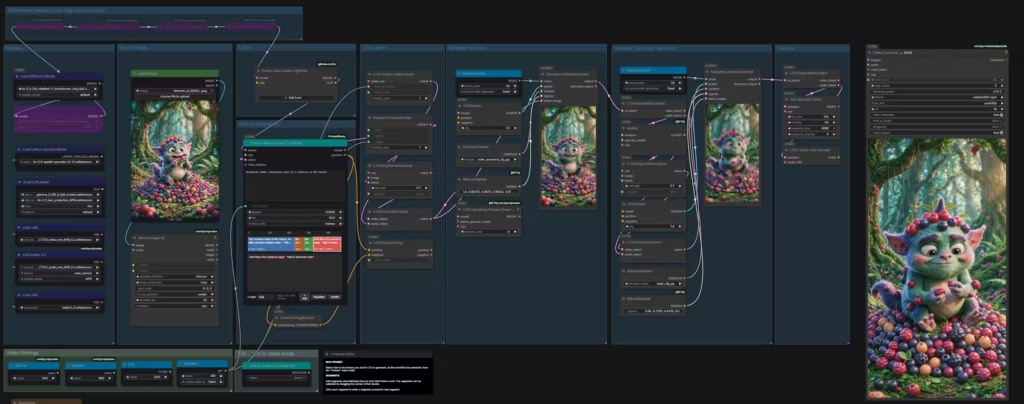
Implementing this architecture locally requires moving away from vanilla sampling pipelines and embracing a specialized nodes ecosystem within ComfyUI. The structural backbone of this implementation relies on the ComfyUI-PromptRelay custom node developed by Kijai. This node serves as the practical execution engine, adapting the mathematical concepts of the original Prompt Relay project.
[Kijai's ComfyUI-PromptRelay] ──> [RuneXX's LTX-2.3 Wrapper] ──> Local Inference PipelineThe foundational code and logic are inspired by the open-source work found in the original Prompt-Relay project for Wan 2.2 by GordonChen19. For creators looking to understand the behavioral limits and capabilities of this technique, GordonChen19’s repository provides excellent, high-fidelity visual examples demonstrating how strict attention routing transforms motion dynamics.
For actual generation, this setup utilizes the production-ready LTX-2.3 workflows curated by RuneXX. Within this ecosystem, workflows generally split into two functional archetypes:
- Single-Reference Image Pipelines: Leveraging a solitary seed frame while using sub-prompts to drive the progressive evolution of the timeline.
- Multi-Reference Image Pipelines: Mapping unique reference images to individual sub-prompts, creating distinct visual anchor points across the generation.
This specific guide focuses exclusively on the single-reference image workflow, establishing a solid baseline before exploring more complex multi-anchor scenarios.
Practical Execution: Benchmark and Temporal Mechanics
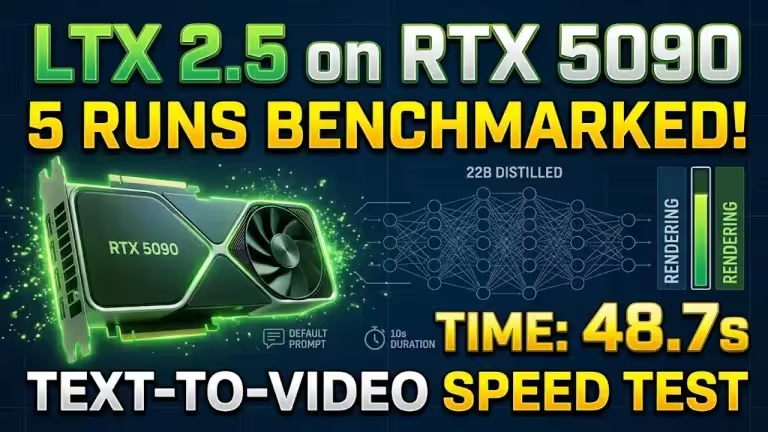
To demonstrate the real-world efficiency of this method, the generation was executed locally on a high-performance infrastructure stack. The hardware pipeline utilized an NVIDIA RTX 5090 paired with an AMD Ryzen 9 5900X. On the software layer, inference ran using the optimized ltx-2.3-22b-distilled-1.1_transformer_only_fp8_scaled.safetensors model weights, deliberately processed without the integration of SageAttention to establish a raw performance baseline.
The operational parameters were set to generate a portrait video at 544×960 resolution, rendered at 24 frames per second with a total duration of 20 seconds.
[Hardware Stack]  NVIDIA RTX 5090 (32GB VRAM) + AMD Ryzen 9 5900X
[Model Variant]   LTX 2.3 22B Distilled FP8 Scaled (Transformer Only)
[Output Spec]     544x960 Portrait | 24 FPS | 20 Seconds (480 Frames Total)
[Compute Time]    111 Seconds
The entire compute cycle required exactly 111 seconds to output 480 frames of highly synchronized video material. The resulting output demonstrates a non-human creature interacting directly with the viewer, executing complex chronological behaviors that mirror the precise frame brackets defined in the ComfyUI logic:
- Frames 0 to 240 (0–10s): The creature maintains a static, uncomfortable posture, explicitly bound to the sub-prompt: “Let’s go for 10 second awkward silence.”
- Frames 241 to 288 (10–12s): The model registers the structural transition, aligning with the marker cue: “10 now.”
- Frames 289 to 336 (12–14s): The facial geometry distorts smoothly into an intentional expression, triggered by the localized instruction: “The creature smiles to the viewer.”
- Frames 337 to 480 (14–20s): The generation concludes by tracking the final semantic phase: “Last 6 seconds now.”
This precise sequence proves that the diffusion model is no longer guessing when to activate semantic features; it is executing them on a programmatic timeline.
Architectural Critique: Structural Advances and Human Inertia
Analyzing this technology under an expert lens reveals a significant paradigm shift, balanced by clear operational constraints. Prompt Relay successfully transforms non-deterministic diffusion noise into a predictable temporal grid, significantly reducing the standard trial-and-error cycle of prompting. By forcing the model’s attention to focus exclusively on specific segments, it guarantees high-fidelity compliance without diluting the global context.
However, a common misconception must be addressed: this node is not a non-linear video editing timeline. It directs the flow of events within a continuous space; it does not execute cinematic cuts. If your narrative requires an abrupt visual jump cut, attempting to force it via sub-prompts within a single generation will likely result in awkward morphing artifacts. For distinct scene changes, the industry standard remains modular generation—rendering separate clips and combining them in post-production tools like DaVinci Resolve or CapCut. Generating everything in a single block should be reserved for scenes where preserving unwavering spatial and audio-visual continuity is paramount.
[Prompt Relay Control] ──> Best for Fluid, Continuous Motion & Dialogue Dynamics
[Modular Generation]   ──> Best for Hard Cinematic Cuts & Drastic Scene Changes
The primary technical hurdle when working with this method is the “Inertia Paradox.” Binding a sub-prompt to a rigid frame index assumes the underlying neural network inherently understands human kinetics and the physical velocity of an action. If you command a character to smile precisely at frame 289, the model must handle the physical acceleration and deceleration of the facial muscles leading into and out of that frame.
If the allocated time bracket is too narrow, the motion will either clip abruptly or fail to manifest entirely. Prompt engineers must calculate these physical safety margins manually, budgeting adequate frame padding within their sub-prompts to give the model’s physics engine room to breathe.
Conclusion and Future Perspectives
Prompt Relay redefines local video synthesis by shifting the methodology away from brute-force prompting and toward surgical attention routing. By decoupling temporal progression from global thematic context, it bridges the gap between chaotic AI generations and structured, director-led storytelling. As local inference pipelines continue to optimize, techniques that manipulate attention matrices at runtime will remain essential for achieving true cinematic control.
FAQ
Does Prompt Relay increase VRAM consumption during inference?
No. Because Prompt Relay is a training-free, inference-time modification that applies distance-based penalties to the existing cross-attention layers, it introduces negligible memory overhead. Your VRAM footprint remains dictated by the base LTX 2.3 model and your target resolution.
Can I use this technique to manage multiple characters performing separate actions?
Yes, but it requires highly detailed spatial prompting within the sub-prompts. While Prompt Relay isolates the temporal aspect perfectly, it does not inherently separate spatial zones. You must combine it with regional conditioning nodes if characters need to execute distinct, simultaneous actions in different parts of the frame.
What happens if two sub-prompts overlap on the same frame index?
If frame indices overlap, the cross-attention modifiers will blend the semantic tokens of both prompts. This can be used intentionally to create smooth transitions between actions, but excessive overlap will reintroduce the temporal entanglement the method is designed to fix.
How to install ComfyUI Prompt Relay
At the time of writing, the Kijai’s official ComfyUI-PromptRelay GitHub repository is not yet indexed or available for direct one-click installation via the ComfyUI Manager interface. To integrate this temporal steering architecture into your local instance, you must execute a manual installation directly from the source repository using the command line.
The following step-by-step procedure targets a standard ComfyUI Desktop environment running on Windows via PowerShell:
1. Activate the ComfyUI Virtual Environment
First, open your terminal, navigate to your root installation directory, and initialize the dedicated Python virtual environment to ensure all dependencies are isolated correctly:
cd C:prgComfyUI_Desktop
./venv_base/Scripts/activate.ps1
2. Clone the Source Repository
Shift your active directory into the custom_nodes folder where ComfyUI modules are structured, then pull the codebase directly from Kijai’s official GitHub repository:
cd C:prgComfyUI_Desktopcustom_nodes
git clone https://github.com/kijai/ComfyUI-PromptRelay.git
3. Install Required Dependencies
Finally, enter the newly created node directory and run the package installer to deploy the mathematical and structural prerequisites required for cross-attention modification:
cd ComfyUI-PromptRelay
pip install -r requirements.txt
Once the installation sequence completes successfully, completely restart your ComfyUI server backend to load the new node structures into your workspace.
Your comments enrich our articles, so don’t hesitate to share your thoughts! Sharing on social media helps us a lot. Thank you for your support!